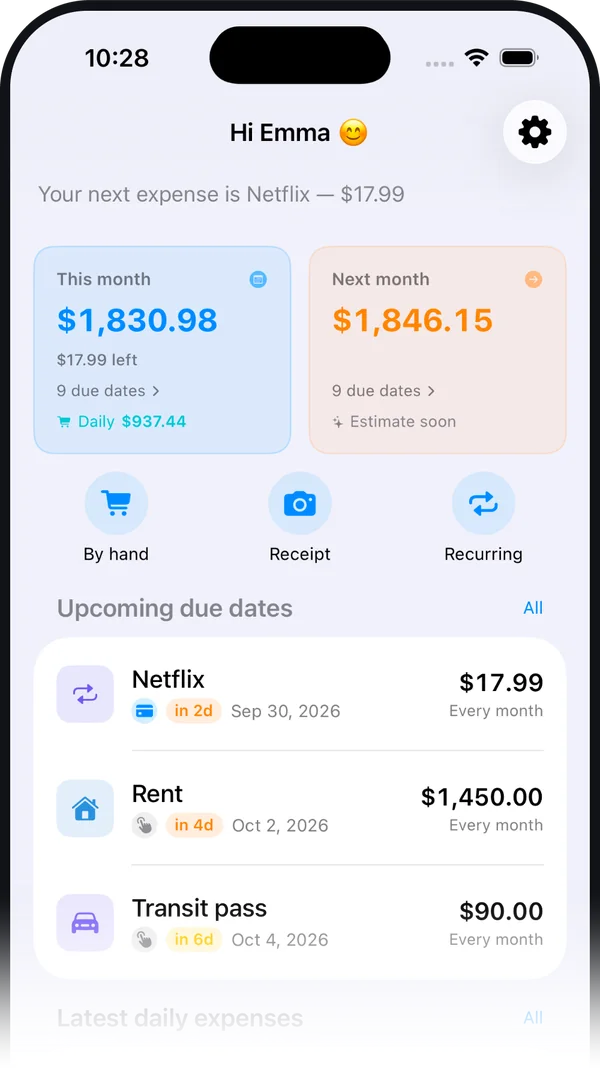
What is Skurda?
It's an iPhone app that tracks two kinds of expenses in one place: ones that repeat over time — subscriptions, bills, rent, insurance, taxes and instalments — and everyday ones, like groceries or a coffee. For a recurring expense, you enter it once, stating how often it repeats: the app works out all future due dates, the total for each month, and warns you before every payment. Daily expenses are added instead automatically when you pay with your phone, by sharing the payment notification, from a receipt photo, or by hand.
Is the app free?
Yes, for up to 10 recurring expenses and 20 daily expenses a month added by hand or from a receipt photo, with no account and no time limit. Reminders, the calendar, the charts, the monthly overview and sharing with another person are all included in the free version. Premium is needed to go beyond those limits, to log payments made with your phone automatically, and for import/export and the annual savings report: price and duration are shown in the app before you confirm the purchase.
How do daily expenses work?
They're everything you spend day to day — gas, groceries, a coffee — always kept separate from recurring expenses. You can log one several ways: automatically when you pay with your phone, through an automation you set up once; by sharing the payment notification with a tap, from iOS's "Share" sheet; by snapping a photo of the receipt, with the merchant, amount and date recognized on their own and the photo never saved; or by hand, in a few seconds.
Does the app connect to my bank account?
No. Skurda does not connect to banks, cards or current accounts, does not make payments and does not cancel subscriptions on your behalf, and never asks for banking credentials. The only automation available is the one you build yourself in Shortcuts to read Wallet notifications on the same phone: it is not a bank connection or an official Apple Pay integration.
Where does my data go?
Names, amounts, categories and notes stay in your iPhone's storage and sync automatically to your own personal iCloud account, so you find them again on other devices signed in with the same Apple Account. There is no developer server: whoever built the app cannot see, receive or store your expenses.
How does the savings report work?
It reads the expenses you have already entered and looks for nine typical situations where money is wasted: several streaming services active at once, monthly subscriptions that might cost less annually, price increases detected in your recorded history, expenses paused in the app but probably still billed by the provider, expenses duplicated by mistake, mortgages worth refinancing, a single category taking up most of your spending, expenses you have not reviewed in over a year, and yearly renewals coming up that are worth comparing with other offers. These are deterministic rules computed on the device: there is no artificial intelligence and no data is sent anywhere.
Does it work without an internet connection?
Yes. All calculations, charts, reminders and the savings report work fully offline, because they happen on the device. A connection is only needed for iCloud sync and for purchasing Premium.
How does it handle bills that change every time?
You can mark an expense as variable: from the calendar you record the amount actually paid at each due date, and for future ones the app shows an estimate based on the average of the most recent recorded amounts, marked with a tilde. If an amount rises compared with the previous one, the savings report flags it.
Which devices and languages does it support?
It runs on iPhone with iOS 17 or later. The interface is available in Italian, English, Spanish, French and German, and the language can be chosen in the app's settings independently of the system language.
Are there ads or tracking?
No. The app shows no ads, uses no ad networks, does not use the IDFA and does not carry out tracking as defined by Apple's rules. It collects only anonymous, aggregated usage statistics, which never include the names or amounts of your expenses and which you can object to at any time by writing to feedbacksr@icloud.com.